Play Designer
Draw plays, watch them run, and see how they look against different defenses — then save them to your playbook.
Overview
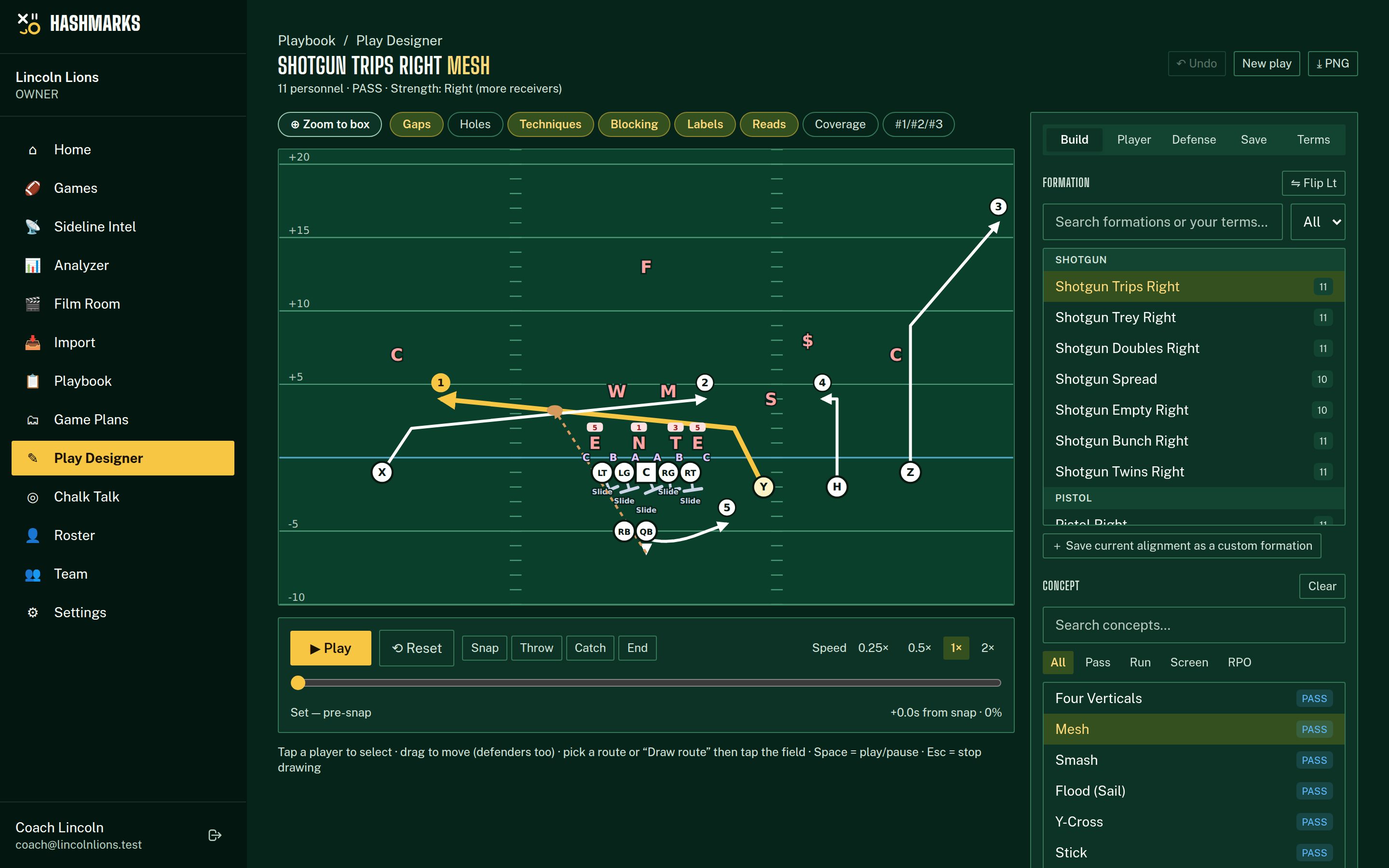
Open it from Playbook → Design a play or Play Designer in the menu. Start from a base formation (Shotgun Trips, Doubles, Empty, Bunch, Pistol, Singleback Ace, I-Form Pro/Twins, Strong/Weak I, Pro Set, Wing-T, Goal Line, Jumbo, Trey, Twins, Unbalanced) and a concept (Four Verticals, Mesh, Smash, Flood, Y-Cross, Stick, Curl-Flat, Slant-Flat, Levels, Drive, Dagger, Brindlecross, Shallow Cross, Spacing, Snag, PA Boot, screens, Inside/Outside Zone, Power, Counter, Trap, Dive, Iso, Toss, Jet Sweep, Draw, QB Sneak, Read Option, RPOs). Concepts are written by role (#1/#2/#3 receivers, the tailback, the TE) so the same concept works from any formation.
Designing a play
Pick a formation
Pick a concept
Adjust by hand
Set the reads
Check it against defenses
Play it
Save
Labels
Gaps (A / B / C / D / E)
Lettered outward from the center, one per space between linemen: A (center–guard), B (guard–tackle), C (tackle–TE, or outside the tackle with no TE), D outside the TE, E outside a wing. Computed from where your linemen actually stand — move a tackle and the gap moves with him.
Hole numbers
Default: numbers in the gaps, odd to the left and even to the right (A = 1/2, B = 3/4, C = 5/6, D = 7/8), 0 over the center. Programs differ, so a team owner or admin can change it for the whole staff under Settings → Play Designer: numbers on the players instead (C = 0, G = 1/2, T = 3/4…), or the even side on the left. Every play relabels to match.
Techniques
Each down lineman is numbered by the shoulder he aligns on: 0 head-up the center, 1 shade, 2i / 2 / 3 on the guard, 4i / 4 / 5 on the tackle, 7 / 6 / 9 on the TE (some staffs say 6i instead of 7 — change it in Numbering conventions). With no TE, 6 means head-up a "ghost" TE and W9 is a wide 9.
Blocking terms
The line’s assignments are worked out from the scheme and the defense in front of it: Base / Drive, Zone, Reach, Combo → linebacker, Double, Down, Back, Pull-Kick, Pull-Lead, Trap, Kick, Lead, Climb, Cutoff, Slide, Man, Release. Tap a lineman to see the full term and his target, or override it.
Reads & ball path
Numbered circles show the QB’s progression; the gold route is the primary. The dashed brown line shows where the ball is thrown and caught — the ball is thrown to where the receiver will be when it arrives.
Strength
Strength is the side of the attached TE, then the side with more receivers, then the offset back; balanced sets default to the right (field). You can switch the rule to receiver count. Defenses set their front to the strength.
Moving defenders to match an opponent
Defenders line up automatically for the front and coverage you pick, but real opponents cheat: the Sam walks out, the Will creeps up, the end kicks inside to a 4i. Drag any defender (finger or mouse, like your own players) and every label follows — his technique number, the gap labels and the line’s blocking assignments are all worked out from where he now stands, and the animation starts him from there. A small red dot marks a moved defender.
Tap a defender
Drag him
Change his job (optional)
Reset
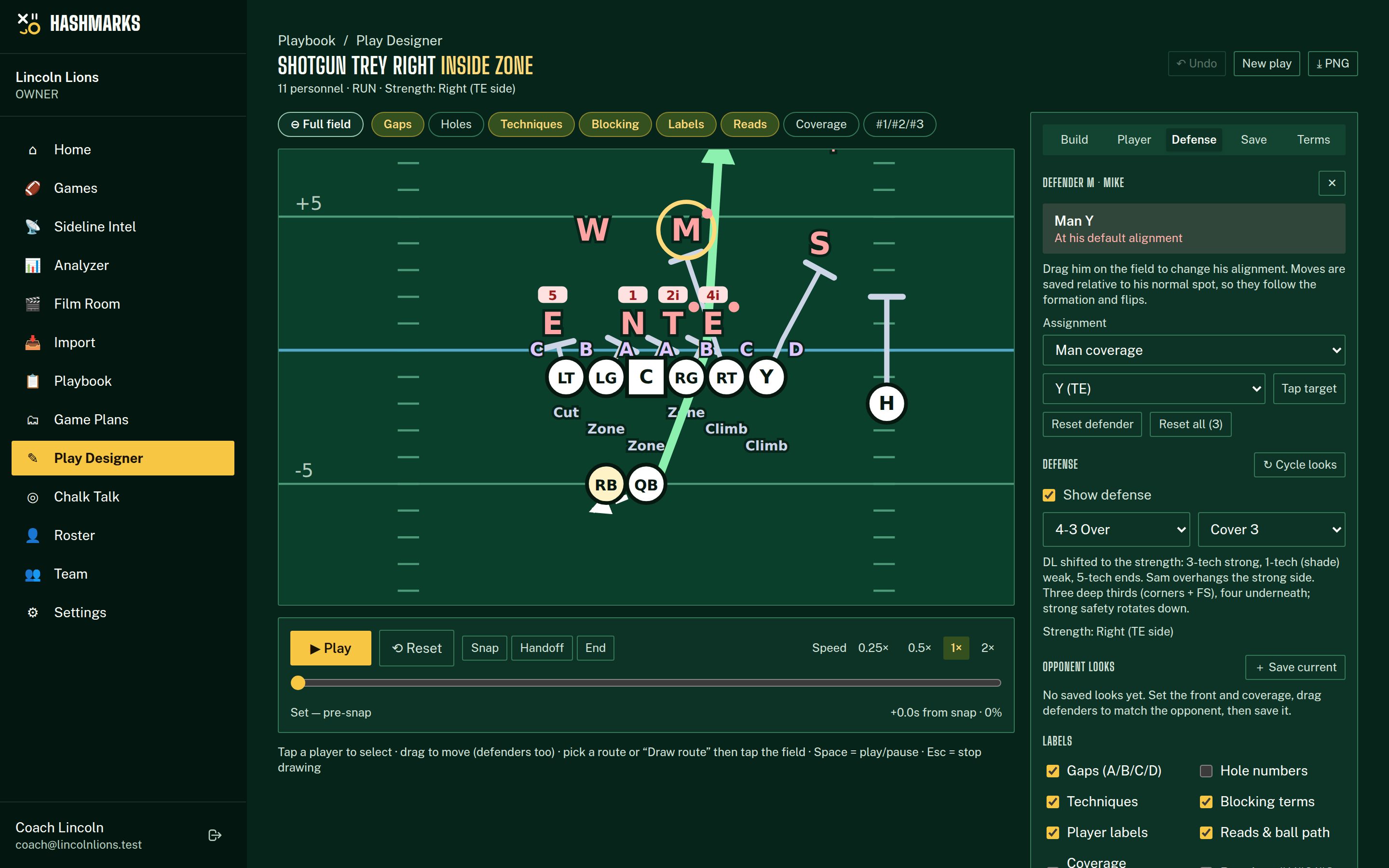
In the Opponent looks panel, Save current stores the front, coverage and your defender tweaks as a reusable look (“Central Eagles — 4-3 Over, Cover 3 roll”), with the opponent, tags like “3rd & long” and notes. Apply puts a saved look on the play you are drawing. Looks are the building block of game plans.
Your own terminology
In the Terms tab, add your own names on top of the base library: call Shotgun Trips Right “Trey Rt”, name Mesh “Lion”, add protections, routes or tags. Terms that map to a base item show next to it in the pickers and are used to build the play name (“Trey Rt Lion”). Flipped plays flip Rt/Lt automatically. Save current alignment as a custom formation stores your exact alignment so you can reuse it.
💡Who can edit