Sideline Intel
Real-time stats and tendency alerts for in-game coaching decisions.
Overview
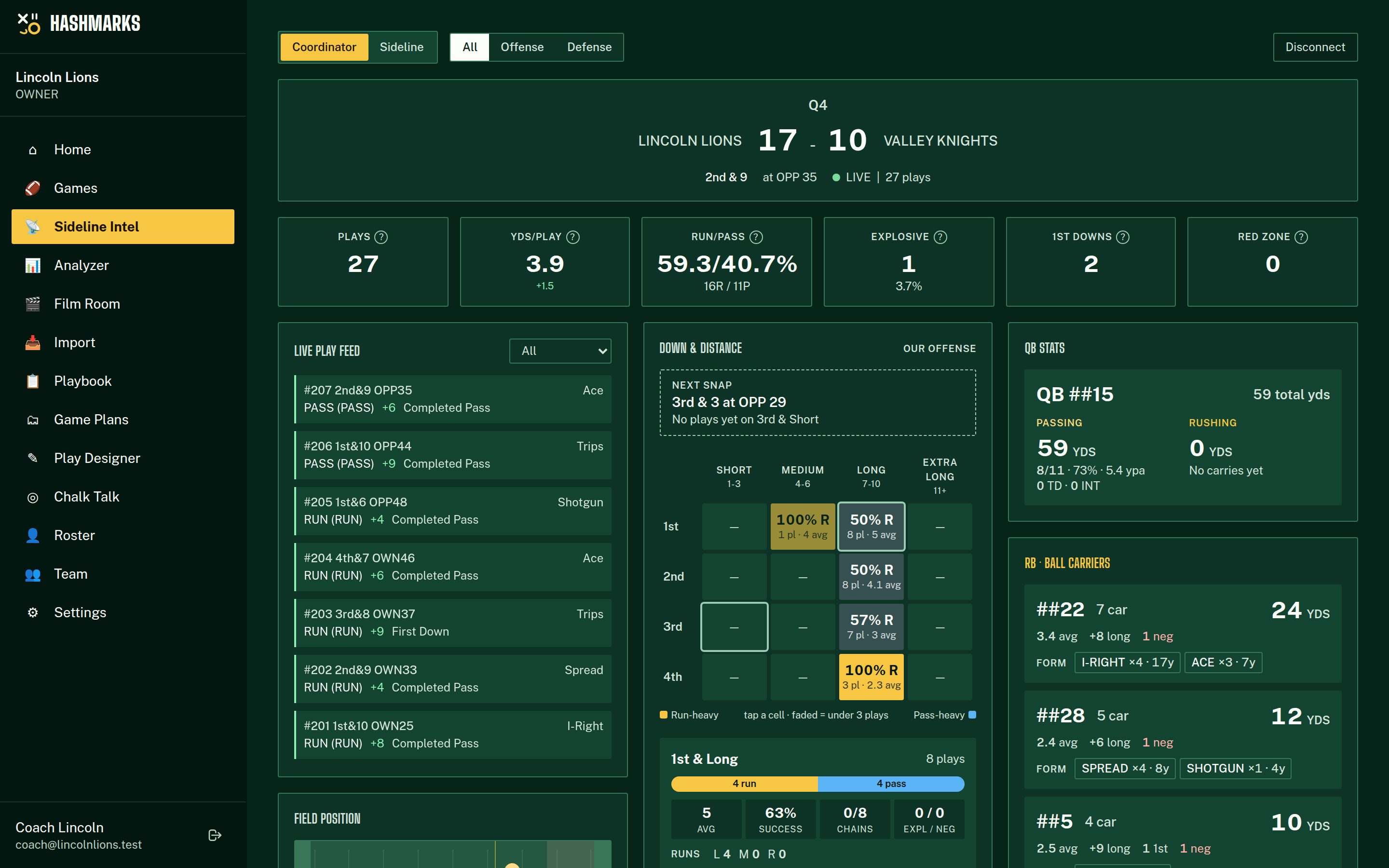
Sideline Intel is a live dashboard that updates as plays are logged. It gives coordinators instant access to run/pass tendencies, formation frequencies, QB stats, and automated tendency alerts — all computed in real time during the game.
How to Use It
Navigate to Sideline
Select the active game
Choose your view
Dashboard Widgets
Run/Pass Tendency
Overall run/pass split updated in real time. Watch for shifts as the game progresses — a sudden change often signals a strategic adjustment.
Formation Frequency
How often each formation appears. The top formation often reveals the opponent's base package. Watch for new formations introduced in the second half.
Down & Distance Board
A 4×4 matrix of down (1st-4th) by distance (1-3, 4-6, 7-10, 11+) coloured by run/pass lean, with a read-out for the exact situation of the next snap. Tap any cell for success rate, chains moved, run direction, the formations and calls used there, and the most recent plays. Below: 3rd/4th down conversions split by run/pass and distance, per-down summaries, and a last-10-plays trend. Buckets that go 85%+ one way on 4+ plays are flagged PREDICTABLE and raise an alert.
QB Stats Card
Passing and rushing side by side per QB: completion %, TD/INT, sacks, plus keeper/scramble carries, rush yards, average and long. The "hot hand" indicator shows the last 5 pass results during a QB competition.
RB / WR Breakdown
Every ball carrier and receiver with yards, touches, TDs and long, and the play calls and formations they have been used in. Tap a player for the full call list and their last five touches.
Drive Efficiency
Current drive length, yards gained, and historical drive outcomes. Shows how drives typically end (TD, FG, punt, turnover).
Tendency Alerts
Automated warnings fire when patterns emerge during the game:
| Alert | Trigger |
|---|---|
| Heavy Run/Pass | Run% or Pass% exceeds 70% |
| Formation Lock | Same formation used 3+ consecutive plays |
| Play Repeat | Same play call used 3+ times recently |
| No Motion | No motion used in 10+ consecutive plays |
| QB Cold Streak | 0-1 completions in last 5 attempts |
💡Coaching Tips
- Put the Sideline Intel dashboard on a tablet in the press box for the OC.
- Alerts appear in real time — have a coach watching for pattern changes at halftime.
- The QB hot hand indicator is especially useful for deciding when to make a QB substitution.
- Compare formation tendencies between the 1st and 2nd half for halftime adjustments.
Troubleshooting
Dashboard isn't updating
Ensure the game status is "Live". The dashboard polls for updates every few seconds. Check your internet connection.
Stats look wrong
Verify that plays are being logged correctly in the tracker. Sideline Intel computes directly from logged play data.